作者: houlijiang

  • git导出代码的方法~archive

    git archieve

    可以用于将库中代码打包。

    1. 基本用法:

    git archive --format tar.gz --output "./output.tar.gz" master
    

    说明:

    • 将master分支打包为output.tar.gz
    • –format指明打包格式,若不指明此项,则根据–output中的文件名推断文件格式。所以你也可以将上述命令简化为:

    git archive --output "./output.tar.gz" master
    

    可以使用-l参数获得支持的文件格式列表。

    [@sjs_73_171 gittest]$ git archive -l
    tar
    tgz
    tar.gz
    zip
    
    • –output指明输出包名

    2. 打包不同的分支或commit

    如果想打包不同分支,只要使用不同分支名即可。比如我有一个分支名为“testbr”,可以用如下命令将其打包。

    git archive --format tar.gz --output "./output.tar.gz" testbr
    

    如果要打包某个commit,只要先使用git log找到相应的commit id, 再使用该commit id打包即可。比如:

    git archive --format tar.gz --output "./output.tar.gz" 5ca16ac0d603603
    

    3. 打包某个目录

    如果想打包master下的mydir mydir2目录,可以用下面命令

    git archive --format tar.gz --output "./output.tar.gz" master mydir mydir2  
    

    4. 注意

    打包建议在代码库的根目录下进行,不然会碰到各种问题。比如,如果在master分支的mydir目录下执行如下命令:

    git archive --output "./output.tar.gz" master
    

    就只会将mydir目录下的内容打包。

    作者:跑马溜溜的球
    链接:https://www.jianshu.com/p/98fa58073554
    来源:简书
    著作权归作者所有。商业转载请联系作者获得授权,非商业转载请注明出处。
  • 解决 VSCode 每次 git pull/push 时都需要输入账号和密码的问题

    在提交项目代码或者拉取代码的时候,如果每次git都要输入用户名密码;
    解决方法: 在 VSCode 的终端输入 git config –global credential.helper store 命令
    在弹框中输入账号和密码,此时输入一次,以后再git push /pull 的时候就不用在输账号和密码了。

  • dubbo 设置注册到注册中心的IP地址为公网IP

    场景
    某些情况下(例如公共测试环境 xx云上ECS 部署了dubbo提供者),
    我们需要将dubbo提供者应用 注册到注册中心的地址为公网ip地址。

    这样方便公司内网或者其他云上应用调用该dubbo提供者的接口服务。

    测试
    dubbo 版本 2.7.8

    查看 dubbo 官方文档,一开始以为 修改属性 dubbo.protocol.host

    # 服务提供者协议配置。对应的配置类: org.apache.dubbo.config.ProtocolConfig。
    # 同时,如果需要支持多协议,可以声明多个 标签,并在 中通过 protocol 属性指定使用的协议。
    protocol:
    name: dubbo
    port: 20207
    host: 8.17.29.89
    1
    2
    3
    4
    5
    6
    上面的 8.17.29.89 是 xx云 ECS 绑定的 弹性公网ip , 然而启动报错:

    org.apache.dubbo.rpc.RpcException: Fail to start server(url: dubbo://8.17.29.89:20207/com.middol.zentao.rpc.jar.ZenTaoAggregationService?anyhost=false&application=zentao-rpc-api&bind.ip=192.168.6.51&bind.port=20207&channel.readonly.sent=true&codec=dubbo&deprecated=false&document=%E7%A6%85%E9%81%93rpc%E6%8E%A5%E5%8F%A3&dubbo=2.0.2&dynamic=true&generic=false&heartbeat=60000&interface=com.middol.zentao.rpc.jar.ZenTaoAggregationService&logger=slf4j&metadata-type=remote&methods=taskInfoList,getById,getUser,bugInfoList,getZenTaoEmployeesLogs,getProductStatistics,getPersonStatistics&pid=21676&qos.accept.foreign.ip=false&qos.enable=true&qos.port=33307&release=2.7.8&revision=1.0-SNAPSHOT&side=provider&timestamp=1627035267274&version=1.0) Failed to bind NettyServer on /192.168.6.51:20207, cause: Cannot assign requested address: bind
    at org.apache.dubbo.rpc.protocol.dubbo.DubboProtocol.createServer(DubboProtocol.java:348) ~[dubbo-2.7.8.jar:2.7.8]
    at org.apache.dubbo.rpc.protocol.dubbo.DubboProtocol.openServer(DubboProtocol.java:320) ~[dubbo-2.7.8.jar:2.7.8]
    at org.apache.dubbo.rpc.protocol.dubbo.DubboProtocol.export(DubboProtocol.java:303) ~[dubbo-2.7.8.jar:2.7.8]
    at org.apache.dubbo.rpc.protocol.ProtocolListenerWrapper.export(ProtocolListenerWrapper.java:64) ~[dubbo-2.7.8.jar:2.7.8]
    at org.apache.dubbo.rpc.protocol.ProtocolFilterWrapper.export(ProtocolFilterWrapper.java:155) ~[dubbo-2.7.8.jar:2.7.8]
    at org.apache.dubbo.qos.protocol.QosProtocolWrapper.export(QosProtocolWrapper.java:66) ~[dubbo-2.7.8.jar:2.7.8]
    at org.apache.dubbo.rpc.Protocol$Adaptive.export(Protocol$Adaptive.java) ~[dubbo-2.7.8.jar:2.7.8]
    at org.apache.dubbo.registry.integration.RegistryProtocol.lambda$doLocalExport$2(RegistryProtocol.java:255) ~[dubbo-2.7.8.jar:2.7.8]
    at java.util.concurrent.ConcurrentHashMap.computeIfAbsent(ConcurrentHashMap.java:1660) ~[na:1.8.0_151]
    at org.apache.dubbo.registry.integration.RegistryProtocol.doLocalExport(RegistryProtocol.java:253) ~[dubbo-2.7.8.jar:2.7.8]
    at org.apache.dubbo.registry.integration.RegistryProtocol.export(RegistryProtocol.java:205) ~[dubbo-2.7.8.jar:2.7.8]
    at org.apache.dubbo.rpc.protocol.ProtocolListenerWrapper.export(ProtocolListenerWrapper.java:62) ~[dubbo-2.7.8.jar:2.7.8]
    at org.apache.dubbo.rpc.protocol.ProtocolFilterWrapper.export(ProtocolFilterWrapper.java:153) ~[dubbo-2.7.8.jar:2.7.8]
    at org.apache.dubbo.qos.protocol.QosProtocolWrapper.export(QosProtocolWrapper.java:64) ~[dubbo-2.7.8.jar:2.7.8]
    at org.apache.dubbo.rpc.Protocol$Adaptive.export(Protocol$Adaptive.java) ~[dubbo-2.7.8.jar:2.7.8]
    at org.apache.dubbo.config.ServiceConfig.doExportUrlsFor1Protocol(ServiceConfig.java:492) ~[dubbo-2.7.8.jar:2.7.8]
    at org.apache.dubbo.config.ServiceConfig.doExportUrls(ServiceConfig.java:325) ~[dubbo-2.7.8.jar:2.7.8]
    at org.apache.dubbo.config.ServiceConfig.doExport(ServiceConfig.java:300) ~[dubbo-2.7.8.jar:2.7.8]
    at org.apache.dubbo.config.ServiceConfig.export(ServiceConfig.java:206) ~[dubbo-2.7.8.jar:2.7.8]
    at org.apache.dubbo.config.bootstrap.DubboBootstrap.lambda$exportServices$15(DubboBootstrap.java:1103) ~[dubbo-2.7.8.jar:2.7.8]
    at java.util.HashMap$Values.forEach(HashMap.java:981) ~[na:1.8.0_151]
    at org.apache.dubbo.config.bootstrap.DubboBootstrap.exportServices(DubboBootstrap.java:1090) ~[dubbo-2.7.8.jar:2.7.8]
    at org.apache.dubbo.config.bootstrap.DubboBootstrap.start(DubboBootstrap.java:901) ~[dubbo-2.7.8.jar:2.7.8]
    at org.apache.dubbo.config.spring.context.DubboBootstrapApplicationListener.onContextRefreshedEvent(DubboBootstrapApplicationListener.java:59) ~[dubbo-2.7.8.jar:2.7.8]
    at org.apache.dubbo.config.spring.context.DubboBootstrapApplicationListener.onApplicationContextEvent(DubboBootstrapApplicationListener.java:52) ~[dubbo-2.7.8.jar:2.7.8]
    at org.apache.dubbo.config.spring.context.OneTimeExecutionApplicationContextEventListener.onApplicationEvent(OneTimeExecutionApplicationContextEventListener.java:40) ~[dubbo-2.7.8.jar:2.7.8]
    at org.springframework.context.event.SimpleApplicationEventMulticaster.doInvokeListener(SimpleApplicationEventMulticaster.java:172) ~[spring-context-5.2.12.RELEASE.jar:5.2.12.RELEASE]
    at org.springframework.context.event.SimpleApplicationEventMulticaster.invokeListener(SimpleApplicationEventMulticaster.java:165) ~[spring-context-5.2.12.RELEASE.jar:5.2.12.RELEASE]
    at org.springframework.context.event.SimpleApplicationEventMulticaster.multicastEvent(SimpleApplicationEventMulticaster.java:139) ~[spring-context-5.2.12.RELEASE.jar:5.2.12.RELEASE]
    at org.springframework.context.support.AbstractApplicationContext.publishEvent(AbstractApplicationContext.java:404) ~[spring-context-5.2.12.RELEASE.jar:5.2.12.RELEASE]
    at org.springframework.context.support.AbstractApplicationContext.publishEvent(AbstractApplicationContext.java:361) ~[spring-context-5.2.12.RELEASE.jar:5.2.12.RELEASE]
    at org.springframework.context.support.AbstractApplicationContext.finishRefresh(AbstractApplicationContext.java:898) ~[spring-context-5.2.12.RELEASE.jar:5.2.12.RELEASE]
    at org.springframework.context.support.AbstractApplicationContext.refresh(AbstractApplicationContext.java:554) ~[spring-context-5.2.12.RELEASE.jar:5.2.12.RELEASE]
    at org.springframework.boot.web.servlet.context.ServletWebServerApplicationContext.refresh(ServletWebServerApplicationContext.java:143) ~[spring-boot-2.3.8.RELEASE.jar:2.3.8.RELEASE]
    at org.springframework.boot.SpringApplication.refresh(SpringApplication.java:758) [spring-boot-2.3.8.RELEASE.jar:2.3.8.RELEASE]
    at org.springframework.boot.SpringApplication.refresh(SpringApplication.java:750) [spring-boot-2.3.8.RELEASE.jar:2.3.8.RELEASE]
    at org.springframework.boot.SpringApplication.refreshContext(SpringApplication.java:405) [spring-boot-2.3.8.RELEASE.jar:2.3.8.RELEASE]
    at org.springframework.boot.SpringApplication.run(SpringApplication.java:315) [spring-boot-2.3.8.RELEASE.jar:2.3.8.RELEASE]
    at org.springframework.boot.SpringApplication.run(SpringApplication.java:1237) [spring-boot-2.3.8.RELEASE.jar:2.3.8.RELEASE]
    at org.springframework.boot.SpringApplication.run(SpringApplication.java:1226) [spring-boot-2.3.8.RELEASE.jar:2.3.8.RELEASE]
    at com.middol.zentao.rpc.Application.main(Application.java:37) [classes/:na]
    Caused by: org.apache.dubbo.remoting.RemotingException: Failed to bind NettyServer on /192.168.6.51:20207, cause: Cannot assign requested address: bind
    at org.apache.dubbo.remoting.transport.AbstractServer.(AbstractServer.java:77) ~[dubbo-2.7.8.jar:2.7.8]
    at org.apache.dubbo.remoting.transport.netty4.NettyServer.(NettyServer.java:77) ~[dubbo-2.7.8.jar:2.7.8]
    at org.apache.dubbo.remoting.transport.netty4.NettyTransporter.bind(NettyTransporter.java:35) ~[dubbo-2.7.8.jar:2.7.8]
    at org.apache.dubbo.remoting.Transporter$Adaptive.bind(Transporter$Adaptive.java) ~[dubbo-2.7.8.jar:2.7.8]
    at org.apache.dubbo.remoting.Transporters.bind(Transporters.java:56) ~[dubbo-2.7.8.jar:2.7.8]
    at org.apache.dubbo.remoting.exchange.support.header.HeaderExchanger.bind(HeaderExchanger.java:44) ~[dubbo-2.7.8.jar:2.7.8]
    at org.apache.dubbo.remoting.exchange.Exchangers.bind(Exchangers.java:70) ~[dubbo-2.7.8.jar:2.7.8]
    at org.apache.dubbo.rpc.protocol.dubbo.DubboProtocol.createServer(DubboProtocol.java:346) ~[dubbo-2.7.8.jar:2.7.8]
    … 40 common frames omitted
    Caused by: java.net.BindException: Cannot assign requested address: bind
    at sun.nio.ch.Net.bind0(Native Method) ~[na:1.8.0_151]

    查看官方文档,debug 源码,知道 host的含义:

    在 Dubbo 中, Provider 启动时主要做两个事情,
    一是启动 server
    二是向注册中心注册服务。
    启动 server 时需要绑定 socket,
    向注册中心注册服务时也需要发送 socket 唯一标识服务地址

    报错无法启动 server Cannot assign requested address: bind, 其实是socket无法启动,socket端口外网无法连接, 理由是 如果服务端套接字绑定在它上面,你的客户端程序就只能在本机访问。

    这里面 暂不讨论源码,总之配置文件中 (dubbo.protocol 或 dubbo.provider 的 host)的host属性,如果要配置 必须配置本机的ip (内网ip 或者 127.0.0.1 或者 不配dubbo自己获取)

    解决
    网上 或者 文档中有几个方法,修改hosts之类的, 我个人解决方法推荐:

    设置 java 系统参数( -Dxxx=value) -DDUBBO_IP_TO_REGISTRY=“8.17.29.89”
    如果是 springboot 可以这样:

    java -jar myDubboRpc-api.jar -DDUBBO_IP_TO_REGISTRY=”8.17.29.89″
    1
    当然 也可以事先 将 DUBBO_IP_TO_REGISTRY 这个参数设置到系统环境变量里面。

    如果是docker 方式,请参考 : https://github.com/apache/dubbo-samples/tree/master/dubbo-samples-docker

    其实就是docker 启动时候指定环境变量 -e DUBBO_IP_TO_REGISTRY = “8.17.29.89”
    ————————————————
    版权声明:本文为CSDN博主「小时候的阳光」的原创文章,遵循CC 4.0 BY-SA版权协议,转载请附上原文出处链接及本声明。
    原文链接:https://blog.csdn.net/gzt19881123/article/details/119042064

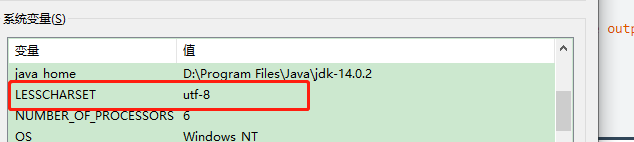
  • windows phpstorm console 不能正确显示中文问题

    2、在 win 中添加系统环境变量
    LESSCHARSET utf-8

    在这里插入图片描述

    设置完毕之后, 重启 phpstorm 就能正确显示中文了。

  • zookeeper & webui

     docker run --name myZookeeper --restart always -e JVMFLAGS="-Xmx1024m" -p 2181:2181 zookeeper
     docker run -t -i -e ZKLIST='172.16.8.212:2181' -p 9090:9090 maauso/zkui

  • 端口转发命令

    netsh interface portproxy add v4tov4  listenaddress=172.16.8.1 listenport=3306connectaddress=192.168.1.58 connectport=3306

    查看端口转发:

    netsh interface portproxy show v4tov4

    关闭端口转发:

    netsh interface portproxy delete v4tov4 listenaddress=192.168.1.8  listenport=33891

  • ideoscribe打开一直空白怎么办? videoscribe白屏的解决办法

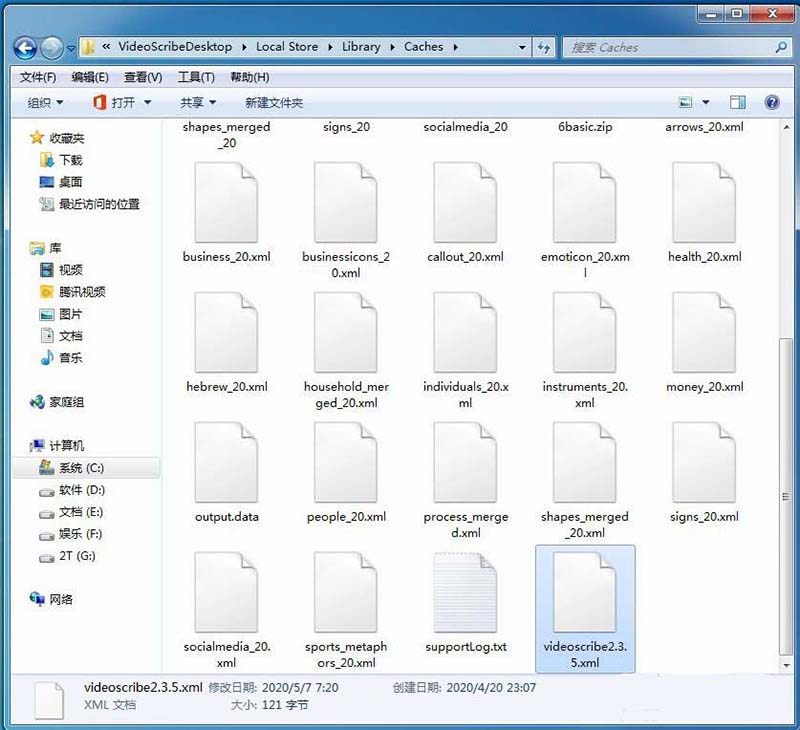
    C:\Users\用户名\AppData\Roaming\VideoScribeDesktop\Local Store\Library\Caches

    打开Caches文件夹,找到videoscribe2.3.5.xml文件

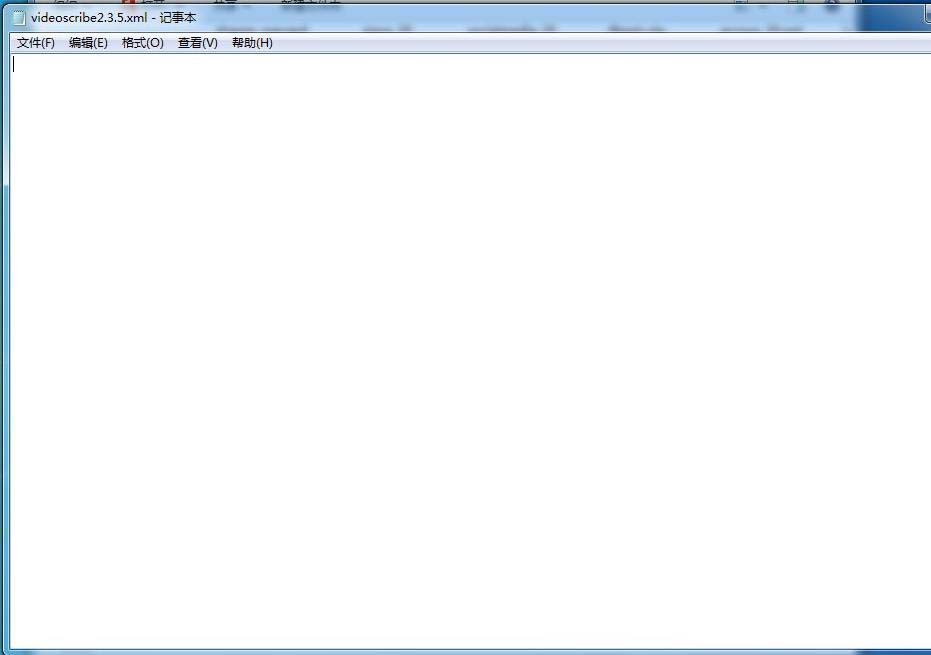
    7、在记事本videoscribe2.3.5.xml里把文件内容删除,然后点击保存

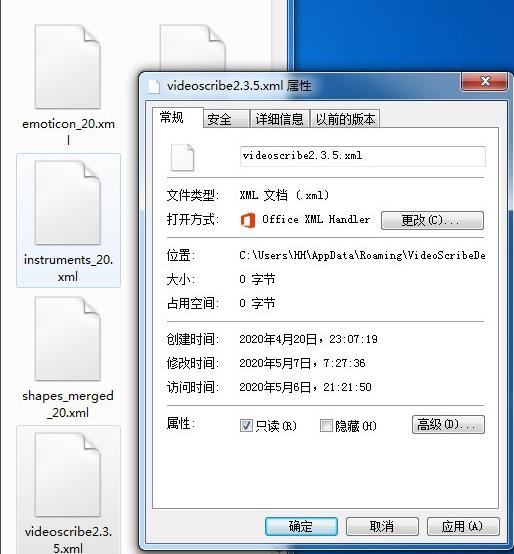
    8、把videoscribe2.3.5.xml文件属性改为只读

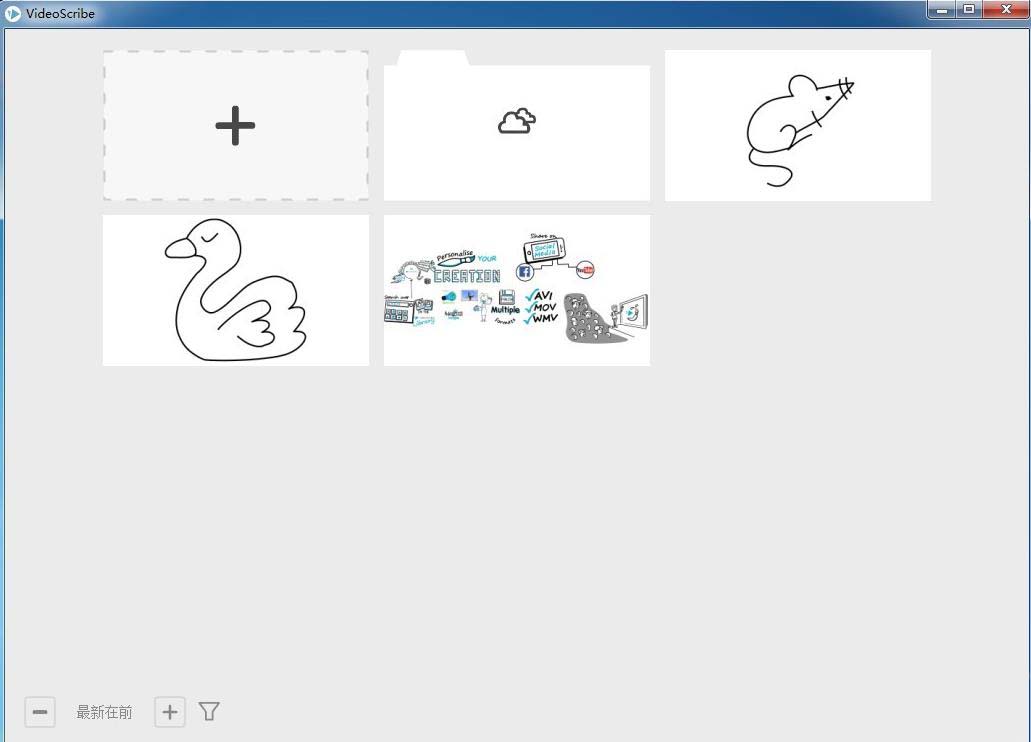
    9、然后就可以顺利打开VideoScribe了。

    以上就是videoscribe白屏的解决办法,希望大家喜欢,请继续关注脚本之家。

  • Docker-compose常用命令

    莫小安

    Docker-compose常用命令

    1.github地址:https://github.com/TodorText/lnmp.git

    这个是根据laradock精简的lnmp,并且摘除了从容器挂载数据卷

    2.命令

    docker-compose –help你会看到如下这么多命令

    build               Build or rebuild servicesbundle              Generate a Docker bundle from the Compose fileconfig              Validate and view the Compose filecreate              Create servicesdown                Stop and remove containers, networks, images, and volumesevents              Receive real time events from containersexec                Execute a command in a running containerhelp                Get help on a commandimages              List imageskill                Kill containerslogs                View output from containerspause               Pause servicesport                Print the public port for a port bindingps                  List containerspull                Pull service imagespush                Push service imagesrestart             Restart servicesrm                  Remove stopped containersrun                 Run a one-off commandscale               Set number of containers for a servicestart               Start servicesstop                Stop servicestop                 Display the running processesunpause             Unpause servicesup                  Create and start containersversion             Show the Docker-Compose version information

    3.常用命令

    docker-compose up -d nginx                     构建建启动nignx容器

    docker-compose exec nginx bash            登录到nginx容器中

    docker-compose down                              删除所有nginx容器,镜像

    docker-compose ps                                   显示所有容器

    docker-compose restart nginx                   重新启动nginx容器

    docker-compose run –no-deps –rm php-fpm php -v  在php-fpm中不启动关联容器,并容器执行php -v 执行完成后删除容器

    docker-compose build nginx                     构建镜像 。        

    docker-compose build –no-cache nginx   不带缓存的构建。

    docker-compose logs  nginx                     查看nginx的日志 

    docker-compose logs -f nginx                   查看nginx的实时日志

    docker-compose config  -q                        验证(docker-compose.yml)文件配置,当配置正确时,不输出任何内容,当文件配置错误,输出错误信息。 

    docker-compose events –json nginx       以json的形式输出nginx的docker日志

    docker-compose pause nginx                 暂停nignx容器

    docker-compose unpause nginx             恢复ningx容器

    docker-compose rm nginx                       删除容器(删除前必须关闭容器)

    docker-compose stop nginx                    停止nignx容器

    docker-compose start nginx                    启动nignx容器

  • git同步远程已删除的分支和删除本地多余的分支

    使用 git branch -a 可以查看本地分支和远程分支情况 

    但远程分支(红色部分)删除后,发现本地并没有同步过来。

    一. 同步本地的远程分支

    查看本地分支和追踪情况:

    git remote show origin

    可以发现红框中的分支是远程分支已被删除的分支,根据提示可以使用 git remote prune 来同步删除这些分支。

    运行命令:

    git remote prune origin

    再次查看分支情况:

     发现红色部分的远程分支已经同步,远程删除的分支,本地也已经不见了。

    二. 删除本地多余分支

    git branch -D feature/chatfix

    本地多余分支已删除

    三.删除远程分支

    git branch --delete --remotes <remote>/<branch>

    git push origin --delete release/3.2.6

  • Composer 国内加速,修改镜像源

    如何修改镜像源

    可以使用阿里巴巴提供的 Composer 全量镜像 https://mirrors.aliyun.com/composer/

    a). 配置只在当前项目生效
    
    
    composer config repo.packagist composer https://mirrors.aliyun.com/composer/
    
     取消当前项目配置
    composer config --unset repos.packagist
    b). 配置全局生效
    composer config -g repo.packagist composer https://mirrors.aliyun.com/composer/
    
     取消全局配置
    composer config -g --unset repos.packagist